
NX Technologies - Bezahl.de (0.2.0)
Download OpenAPI specification:Download
This document describes the handling of the API and the basic concepts of sending payment requests and how to get updates when a buyer paid the payments.
The API is a JSON REST API which reports every information in Realtime. There are no batch processes involved. (an additional Webhook will be released soon)
User An User can signup and us the service for free. All users are identified via the email address.
Organizations To send a payment request an user has to create an organizations, which holds the information about organization address, target iban, allowed payment methods An organization can have multiple users with different roles.
Orders and Payments The payment request is call order within the API. Every order belongs to an organization and an creator user. When a payer does a payment the order will be updated with the information regarding the payment status.
- Every Organization has (without a contract) the ability to send only 2 orders and invite one additional user.
- If you use the Staging Enviroment and it is down more than 10 Minutes, please inform us, that you need this enviroment.
- If you miss any API Endpoint, we may have not documented the endpoint yet, just ask us and we are happy to help you.
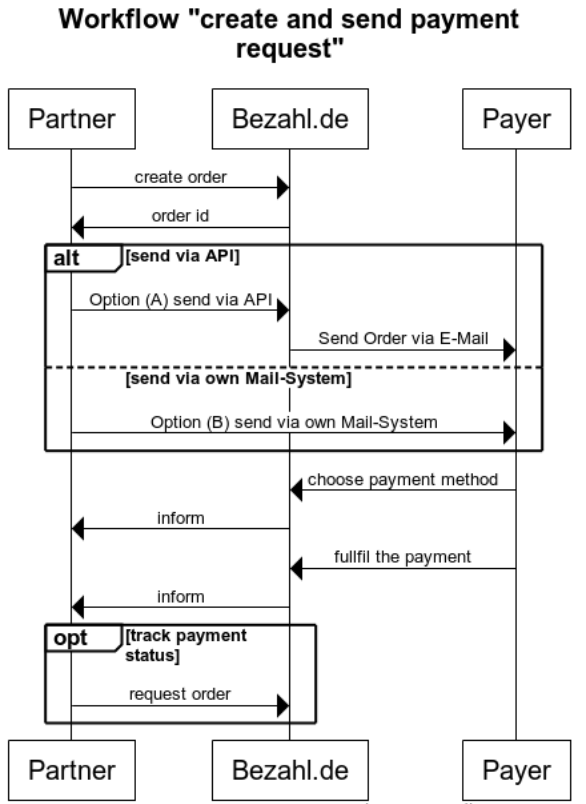
You create a new payment request (order)
 POST [API]/order
 {
   "name": "Zahlung #123", // public name
   "price": 1000000, // price in euro cent
   "orgId": "abcdef", // organization id
 }

 // response
 {
   "id": "BJ8ivGHSKq", // order reference
   ...
 }
(Optional) You send the order via E-Mail
 POST [API]/order/:orderid/recipient
 {
   "recipient" : {
     "email": "mail@example.com"
   }
 }

 //response
 { ... }
Payer will receive the payment request via email (from Bezahl.de) or direct from the Dealer
Payer will choose one of the payment methods and will start the payment process
Every status update is requestable via API
 GET [API]/order/:orderid

 //response
 {
   "status": "open",
   ...
 }
- Frontend: https://partner.bezahl.de
- API: https://partner.staging.sicherbezahlen.de/nxt/v1/[path] (Hostname for Staging may change in near future)
For the Authentication with our System we provide a Token which you can generate at [host]/clients.
Then the user receives a token which should be provided for each Call as NX-Token Header.
- Now you can access the API in the name of the user with the HTTP Header NX-Token.
 curl -X GET \
   https://partner.staging.sicherbezahlen.de/nxt/v1/user \
   -H 'Content-Type: application/json' \
   -H 'NX-Token: [token]'
login
 curl -X POST \
   https://partner.staging.sicherbezahlen.de/nxt/v1/auth/login \
   -H 'Content-Type: application/json' \
   -d '{
     "email": "",
     "password": ""
   }'
grap the temporary token from the Response and put at [TOKEN]
 curl -X POST \
   https://partner.staging.sicherbezahlen.de/nxt/v1/auth/token \
   -H 'Content-Type: application/json' \
   -H 'NX-Token: [TOKEN]' \
   -d '{
     "expiresIn": "86400",
     "description": "generic api token or put your name in it"
   }'
 // expiresIn: provides the expires seconds from now.
 // description: any description you want to provide to the user

 // response
 {
   "token": "[TOKEN]"
 }
If you have any questions, don't hesitate to contact us at dev@nx-technologies.com or our customer service at https://bezahl.de.
getUser Data
This can only be done by the logged in user.
header Parameters
| NX-Token required | string |
Responses
successful operation
Response samples
- 200
- "id": "SJyN6dR-7",
- "email": "foo@bar.de",
- "activeOrganization": "5b3379c1b81d2b5c81619f85"
get list of organization
This can only be done by the logged in user.
header Parameters
| NX-Token required | string |
Responses
successful operation
Response samples
- 200
- {
- "id": "string",
- "key": "string",
- "name": "string",
- "nick": "string",
- "picture": "string",
- "contact": {
- "city": "string",
- "street": "string",
- "streetnumber": "string",
- "zip": "string",
- "email": "string"
- "users": [
- {
- "id": 0,
- "contactData": {
- "name": "string",
- "surname": "string",
- "city": "string",
- "street": "string",
- "streetnumber": "string",
- "zip": "string",
- "mobilenumber": "string"
- "bankaccounts": [
- {
- "name": "string",
- "iban": "string",
- "bic": "string"
- "paymentoptions": {
- "cash": true,
- "escrow": true,
- "sepa": true,
- "fts": true
get one organization
This can only be done by the logged in user.
path Parameters
| orgId required | string id of the organization |
header Parameters
| NX-Token required | string |
Responses
successful operation
Response samples
- 200
- "id": "string",
- "key": "string",
- "name": "string",
- "nick": "string",
- "picture": "string",
- "contact": {
- "city": "string",
- "street": "string",
- "streetnumber": "string",
- "zip": "string",
- "email": "string"
- "users": [
- {
- "id": 0,
- "contactData": {
- "name": "string",
- "surname": "string",
- "city": "string",
- "street": "string",
- "streetnumber": "string",
- "zip": "string",
- "mobilenumber": "string"
- "bankaccounts": [
- {
- "name": "string",
- "iban": "string",
- "bic": "string"
- "paymentoptions": {
- "cash": true,
- "escrow": true,
- "sepa": true,
- "fts": true
get all orders
This can only be done by the logged in user.
header Parameters
| NX-Token required | string |
Responses
successful operation
Response samples
- 200
- {
- "name": "string",
- "price": 0,
- "organization": "string",
- "status": "open",
- "paymentselected": true,
- "pickupdate": "2018-10-15",
- "paymentoptions": {
- "cash": true,
- "escrow": true,
- "sepa": true,
- "fts": true
- "payments": [
- {
- "amount": 0,
- "order": "string",
- "type": "cash",
- "status": "created"
- "attachements": [
- {
- "name": "string",
- "url": "string"
- "recipient": [
- {
- "email": "string"
- "creator": {
- "id": "string",
- "fullname": "string",
- "email": "string"
- "contactperson": {
- "id": "string",
- "fullname": "string",
- "email": "string"
get one order
This can only be done by the logged in user.
path Parameters
| id required | string id of the single order |
header Parameters
| NX-Token required | string |
Responses
successful operation
Response samples
- 200
- "name": "string",
- "price": 0,
- "organization": "string",
- "status": "open",
- "paymentselected": true,
- "pickupdate": "2018-10-15",
- "paymentoptions": {
- "cash": true,
- "escrow": true,
- "sepa": true,
- "fts": true
- "payments": [
- {
- "amount": 0,
- "order": "string",
- "type": "cash",
- "status": "created"
- "attachements": [
- {
- "name": "string",
- "url": "string"
- "recipient": [
- {
- "email": "string"
- "creator": {
- "id": "string",
- "fullname": "string",
- "email": "string"
- "contactperson": {
- "id": "string",
- "fullname": "string",
- "email": "string"
add new order
This can only be done by the logged in user.
header Parameters
| NX-Token required | string |
Request Body schema: application/json
| orgId | string id of the organization the order will be assigned |
| name | string title for the order |
| price | integer price in cent |
| pickupdate | string <date> date as UTC timestamp. |
| contactperson | string <email> The user's e-mail address, which is displayed to the buyer as a contact person. If this field is empty, the requesting user will be used. |
Responses
successful operation
Request samples
- Payload
- "orgId": "string",
- "name": "string",
- "price": 0,
- "pickupdate": "2018-10-15",
- "contactperson": "user@example.com"
Response samples
- 200
- "responsekey": "order.add.success",
- "responsemessage": "Erfolgreich gespeichert"
upload attachement
This can only be done by the logged in user.
path Parameters
| id required | string id of the single order |
header Parameters
| NX-Token required | string |
Request Body schema: application/json
| attachement | string <byte> |
Responses
successful operation
Request samples
- Payload
- "attachement": "string"
Response samples
- 200
- "responsekey": "order.attachement.success",
- "responsemessage": "Erfolgreich gespeichert"
add recipient
This can only be done by the logged in user.
path Parameters
| id required | string id of the single order |
header Parameters
| NX-Token required | string |
Request Body schema: application/json
| recipient | object |
Responses
successful operation
Request samples
- Payload
- "recipient": {
- "email": "string"
Response samples
- 200
- "responsekey": "order.attachement.success",
- "responsemessage": "Erfolgreich gespeichert"
get webhoook list
This can only be done by the logged in user.
header Parameters
| NX-Token required | string |
Responses
successful operation
Response samples
- 200
- {
- "id": "string",
- "organization": "string",
- "url": "string",
- "craeteDate": "2018-10-15"
post webhoook
This can only be done by the logged in user.
header Parameters
| NX-Token required | string |
Request Body schema: application/json
| orgId | string |
| url | string |
| secret | string |
Responses
successful operation
Request samples
- Payload
- "orgId": "string",
- "url": "string",
- "secret": "string"
Response samples
- 200
- "responsekey": "webhook.create.success",
- "responsemessage": "Erfolgreich gespeichert"
delete webhoook
This can only be done by the logged in user.
header Parameters
| NX-Token required | string |
Request Body schema: application/json
| orgId | string |
| id | string |
Responses
successful operation
Request samples
- Payload
- "orgId": "string",
- "id": "string"
Response samples
- 200
- "responsekey": "webhook.delete.success",
- "responsemessage": "Erfolgreich gespeichert"